
| 일 | 월 | 화 | 수 | 목 | 금 | 토 |
|---|---|---|---|---|---|---|
| 1 | 2 | 3 | 4 | 5 | 6 | |
| 7 | 8 | 9 | 10 | 11 | 12 | 13 |
| 14 | 15 | 16 | 17 | 18 | 19 | 20 |
| 21 | 22 | 23 | 24 | 25 | 26 | 27 |
| 28 | 29 | 30 | 31 |
- 안드로이드 레트로핏 사용법
- 멤버변수
- 큐 자바 코드
- rxjava cold observable
- 안드로이드 라이선스
- 플러터 설치 2022
- ar vr 차이
- 서비스 쓰레드 차이
- ANR이란
- 2022 플러터 안드로이드 스튜디오
- rxjava disposable
- 서비스 vs 쓰레드
- 안드로이드 레트로핏 crud
- 2022 플러터 설치
- 안드로이드 os 구조
- rxjava hot observable
- 안드로이드 유닛테스트란
- android ar 개발
- Rxjava Observable
- 안드로이드 유닛 테스트
- 객체
- 자바 다형성
- 클래스
- jvm이란
- 안드로이드 유닛 테스트 예시
- 안드로이드 라이선스 종류
- jvm 작동 원리
- 스택 큐 차이
- android retrofit login
- 스택 자바 코드
- Today
- Total
나만을 위한 블로그
[Flutter] Retrofit, Dio 사용해서 네트워크 통신하기 - 1 - 본문
※ 갤럭시 기기, iOS 에뮬레이터에서 작동 확인
우선 pubspec.yaml에 라이브러리 몇 개를 추가해야 한다. 아래 문서를 보고 필요한 라이브러리를 추가한다.
https://mings.in/retrofit.dart/
retrofit - Dart API docs
Retrofit For Dart retrofit.dart is a type conversion dio client generator using source_gen and inspired by Chopper and Retrofit. Usage Generator Add the generator to your dev dependencies dependencies: retrofit: ^4.9.0 logger: ^2.6.0 # for logging purpose
mings.in
필요한 라이브러리는 아래와 같다.
- retrofit
- logger (로그용)
- json_annotation
- retrofit_generator
- build_runner
- json_serializable
내가 사용한 pubspec.yaml의 버전은 아래와 같다.
environment:
  sdk: '>=3.5.0 <4.0.0'

dependencies:
  flutter:
    sdk: flutter

  cupertino_icons: ^1.0.8
  shake: ^3.0.0
  intl: ^0.20.2
  logger: ^2.6.2
  retrofit: 4.4.0
  json_annotation: ^4.9.0
  dio: ^5.9.0

dev_dependencies:
  flutter_test:
    sdk: flutter

  flutter_lints: ^6.0.0
  build_runner: ^2.4.0
  retrofit_generator: 8.1.0
  json_serializable: ^6.8.0
retrofit과 retrofit_generator 등 다른 라이브러리들의 버전을 바꾸면 xxx.g.dart에서 컴파일 에러가 발생하거나 버전 충돌이 발생하는 등 여러 오류가 있는데 이 버전으로 사용하니 다른 오류들이 발생하지 않았다.
여담으로 AI에 물어보니 아래와 같은 순서로 명령어를 실행하라고 한다.
Remove-Item pubspec.lock -ErrorAction SilentlyContinue
Remove-Item -Recurse -Force .dart_tool -ErrorAction SilentlyContinue
flutter pub get
dart run build_runner clean
dart run build_runner build --delete-conflicting-outputs
위 2줄은 pubspec.lock 파일을 없애서 설치된 패키지들의 버전 기록을 제거한 다음, ".dart_tool" 폴더를 강제 삭제하는 명령어들이다. ".dart_tool" 폴더는 dart, flutter 빌드 도구들이 쓰는 캐시, 임시 파일 저장소로 build_runner가 만든 파일 등이 포함된다.
"-Recurse"는 하위 폴더를 모두 삭제하고 "-Force"는 읽기 전용 파일도 강제로 삭제하는 옵션이고 "-ErrorAction SilentlyContinue"는 폴더가 없어도 에러 없이 계속 진행하라는 옵션이다.
api는 json placeholder API를 사용할 거기 때문에 아래와 같은 파일들을 만들어 준다.
import 'package:json_annotation/json_annotation.dart';
part 'user_dto.g.dart';

@JsonSerializable()
class UserDto {
  final int id;
  final String name;
  final String username;
  final String email;
  final Address address;
  final String phone;
  final String website;
  final Company company;

  UserDto({
    required this.id,
    required this.name,
    required this.username,
    required this.email,
    required this.address,
    required this.phone,
    required this.website,
    required this.company,
  });

  factory UserDto.fromJson(Map<String, dynamic> json) => _$UserDtoFromJson(json);
  Map<String, dynamic> toJson() => _$UserDtoToJson(this);
}

@JsonSerializable()
class Address {
  final String street;
  final String suite;
  final String city;
  final String zipcode;
  final Geo geo;

  Address({
    required this.street,
    required this.suite,
    required this.city,
    required this.zipcode,
    required this.geo,
  });

  factory Address.fromJson(Map<String, dynamic> json) => _$AddressFromJson(json);
  Map<String, dynamic> toJson() => _$AddressToJson(this);
}

@JsonSerializable()
class Geo {
  final String lat;
  final String lng;

  Geo({
    required this.lat,
    required this.lng,
  });

  factory Geo.fromJson(Map<String, dynamic> json) => _$GeoFromJson(json);
  Map<String, dynamic> toJson() => _$GeoToJson(this);
}

@JsonSerializable()
class Company {
  final String name;
  final String catchPhrase;
  final String bs;

  Company({
    required this.name,
    required this.catchPhrase,
    required this.bs,
  });

  factory Company.fromJson(Map<String, dynamic> json) => _$CompanyFromJson(json);
  Map<String, dynamic> toJson() => _$CompanyToJson(this);
}
import 'package:dio/dio.dart';
import 'package:flutter_practice/model/user_dto.dart';
import 'package:retrofit/retrofit.dart';
part 'user_api.g.dart';
@RestApi(baseUrl: "https://jsonplaceholder.typicode.com")
abstract class UserApi {
factory UserApi(Dio dio, {String baseUrl}) = _UserApi;
@GET("/users")
Future<List<UserDto>> getUsers();
}
이렇게 작성하고 아래 명령어를 실행한다.
dart run build_runner build --delete-conflicting-outputs
그럼 잠시 후에 user_api.g.dart, user_dto.g.dart 라는 파일들이 자동 생성된다.
이제 레트로핏을 써서 json placeholder API로 요청하고 받은 응답을 UI로 그리면 된다.
아래는 예시 코드다.
import "package:dio/dio.dart";
import "package:flutter/material.dart";
import "package:flutter_practice/api/user_api.dart";
import "package:flutter_practice/model/user_dto.dart";

class RetrofitTest extends StatefulWidget {
  const RetrofitTest({super.key});

  @override
  State<RetrofitTest> createState() => _RetrofitTestState();
}

class _RetrofitTestState extends State<RetrofitTest> {
  late final UserApi _userApi;
  List<UserDto> _users = [];
  bool _isLoading = false;
  String? _errorMessage;

  @override
  void initState() {
    super.initState();
    _initializeApi();
    _fetchUsers();
  }

  void _initializeApi() {
    final dio = Dio(
      BaseOptions(
        connectTimeout: const Duration(seconds: 30),
        receiveTimeout: const Duration(seconds: 30),
        headers: { /// TODO : 403 에러가 뜨면 User-Agent 수정
          "User-Agent": "...",
          "Accept": "application/json",
          "Accept-Language": "ko-KR,ko;q=0.9",
          "Accept-Encoding": "gzip, deflate, br",
          "Connection": "keep-alive",
        },
        followRedirects: true,
        maxRedirects: 5,
      ),
    );

    dio.interceptors.add(
      InterceptorsWrapper(
        onRequest: (options, handler) {
          debugPrint("요청 : ${options.method} ${options.uri}");
          return handler.next(options);
        },
        onResponse: (response, handler) {
          debugPrint("응답 : ${response.statusCode}");
          return handler.next(response);
        },
        onError: (error, handler) {
          debugPrint("에러 - ${error.response?.statusCode} : ${error.message}");
          return handler.next(error);
        },
      ),
    );

    _userApi = UserApi(dio);
  }

  Future<void> _fetchUsers() async {
    setState(() {
      _isLoading = true;
      _errorMessage = null;
    });

    try {
      final result = await _userApi.getUsers();
      if (mounted) {
        setState(() {
          _isLoading = false;
          _users = result;
        });
      }
    } on DioException catch (e) {
      if (mounted) {
        setState(() {
          _isLoading = false;
          _errorMessage = _handleDioError(e);
        });
      }
    } catch (e) {
      if (mounted) {
        setState(() {
          _isLoading = false;
          _errorMessage = "알 수 없는 에러: $e";
        });
      }
    }
  }

  String _handleDioError(DioException error) {
    if (error.response?.statusCode == 403) {
      return "접근 거부됨.\nCloudflare에 의해 차단됐을 수 있습니다.\n\n다른 네트워크로 시도해 주세요";
    }

    return switch (error.type) {
      DioExceptionType.connectionTimeout => "연결 시간 초과",
      DioExceptionType.sendTimeout => "전송 시간 초과",
      DioExceptionType.receiveTimeout => "응답 시간 초과",
      DioExceptionType.badResponse => "서버 오류: ${error.response?.statusCode}",
      DioExceptionType.cancel => "요청 취소됨",
      DioExceptionType.connectionError => "네트워크 연결 에러\n인터넷 연결을 확인해주세요",
      _ => "네트워크 에러: ${error.message}",
    };
  }

  @override
  Widget build(BuildContext context) {
    return Scaffold(
      appBar: AppBar(
        title: const Text("Retrofit 테스트"),
        backgroundColor: Theme.of(context).colorScheme.inversePrimary,
        actions: [
          IconButton(
            icon: const Icon(Icons.refresh),
            onPressed: _isLoading ? null : _fetchUsers,
            tooltip: "새로고침",
          ),
        ],
      ),
      body: _buildBody(),
    );
  }

  Widget _buildBody() {
    if (_isLoading) return _buildLoadingView();

    if (_errorMessage != null) return _buildErrorView();

    if (_users.isEmpty) return _buildEmptyView();

    return _buildUserList();
  }

  Widget _buildLoadingView() {
    return const Center(
      child: Column(
        mainAxisAlignment: MainAxisAlignment.center,
        children: [
          CircularProgressIndicator(),
          SizedBox(height: 16),
          Text("로딩 중..."),
        ],
      ),
    );
  }

  Widget _buildErrorView() {
    return Center(
      child: Padding(
        padding: const EdgeInsets.all(32),
        child: Column(
          mainAxisAlignment: MainAxisAlignment.center,
          children: [
            const Icon(Icons.error_outline, size: 64, color: Colors.red),
            const SizedBox(height: 16),
            Text(
              _errorMessage!,
              style: const TextStyle(fontSize: 16, color: Colors.red),
              textAlign: TextAlign.center,
            ),
            const SizedBox(height: 24),
            ElevatedButton.icon(
              onPressed: _fetchUsers,
              icon: const Icon(Icons.refresh),
              label: const Text("재시도"),
            ),
          ],
        ),
      ),
    );
  }

  Widget _buildEmptyView() {
    return const Center(
      child: Column(
        mainAxisAlignment: MainAxisAlignment.center,
        children: [
          Icon(Icons.people_outline, size: 64, color: Colors.grey),
          SizedBox(height: 16),
          Text("사용자 데이터 없음"),
        ],
      ),
    );
  }

  Widget _buildUserList() {
    return ListView.builder(
      padding: const EdgeInsets.symmetric(vertical: 8),
      itemCount: _users.length,
      itemBuilder: (context, index) => _buildUserCard(_users[index]),
    );
  }

  Widget _buildUserCard(UserDto user) {
    return Card(
      margin: const EdgeInsets.symmetric(horizontal: 12, vertical: 6),
      elevation: 2,
      child: ListTile(
        contentPadding: const EdgeInsets.symmetric(horizontal: 16, vertical: 8),
        leading: _buildUserAvatar(user.name),
        title: Text(
          user.name,
          style: const TextStyle(fontWeight: FontWeight.bold),
        ),
        subtitle: _buildUserSubtitle(user),
        trailing: Icon(
          Icons.chevron_right,
          color: Colors.grey[400],
        ),
        onTap: () => _showUserDetail(user),
      ),
    );
  }

  Widget _buildUserAvatar(String name) {
    return CircleAvatar(
      backgroundColor: Theme.of(context).colorScheme.primary,
      child: Text(
        name[0].toUpperCase(),
        style: const TextStyle(
          color: Colors.white,
          fontWeight: FontWeight.bold,
        ),
      ),
    );
  }

  Widget _buildUserSubtitle(UserDto user) {
    return Column(
      crossAxisAlignment: CrossAxisAlignment.start,
      children: [
        const SizedBox(height: 4),
        Text("@${user.username}"),
        Text(
          user.email,
          style: TextStyle(
            fontSize: 12,
            color: Colors.grey[600],
          ),
        ),
      ],
    );
  }

  void _showUserDetail(UserDto user) {
    showDialog(
      context: context,
      builder: (context) => AlertDialog(
        title: _buildDialogTitle(user),
        content: _buildDialogContent(user),
        actions: [
          TextButton(
            onPressed: () => Navigator.pop(context),
            child: const Text("닫기"),
          ),
        ],
      ),
    );
  }

  Widget _buildDialogTitle(UserDto user) {
    return Row(
      children: [
        _buildUserAvatar(user.name),
        const SizedBox(width: 12),
        Expanded(
          child: Text(
            user.name,
            style: const TextStyle(fontSize: 20),
          ),
        ),
      ],
    );
  }

  Widget _buildDialogContent(UserDto user) {
    return SingleChildScrollView(
      child: Column(
        crossAxisAlignment: CrossAxisAlignment.start,
        mainAxisSize: MainAxisSize.min,
        children: [
          _buildBasicInfoSection(user),
          const SizedBox(height: 16),
          _buildAddressSection(user.address),
          const SizedBox(height: 16),
          _buildCompanySection(user.company),
        ],
      ),
    );
  }

  Widget _buildBasicInfoSection(UserDto user) {
    return _buildSection(
      title: "기본 정보",
      children: [
        _buildInfoRow("ID", user.id.toString()),
        _buildInfoRow("사용자명", user.username),
        _buildInfoRow("이메일", user.email),
        _buildInfoRow("전화번호", user.phone),
        _buildInfoRow("웹사이트", user.website),
      ],
    );
  }

  Widget _buildAddressSection(Address address) {
    return _buildSection(
      title: "주소",
      children: [
        _buildInfoRow("거리", address.street),
        _buildInfoRow("스위트", address.suite),
        _buildInfoRow("도시", address.city),
        _buildInfoRow("우편번호", address.zipcode),
        _buildInfoRow("위도", address.geo.lat),
        _buildInfoRow("경도", address.geo.lng),
      ],
    );
  }

  Widget _buildCompanySection(Company company) {
    return _buildSection(
      title: "회사",
      children: [
        _buildInfoRow("회사명", company.name),
        _buildInfoRow("캐치프레이즈", company.catchPhrase),
        _buildInfoRow("사업", company.bs),
      ],
    );
  }

  Widget _buildSection({
    required String title,
    required List<Widget> children,
  }) {
    return Column(
      crossAxisAlignment: CrossAxisAlignment.start,
      children: [
        Text(
          title,
          style: const TextStyle(
            fontWeight: FontWeight.bold,
            fontSize: 16,
            color: Colors.black87,
          ),
        ),
        const SizedBox(height: 8),
        ...children,
      ],
    );
  }

  Widget _buildInfoRow(String label, String value) {
    return Padding(
      padding: const EdgeInsets.symmetric(vertical: 4),
      child: Row(
        crossAxisAlignment: CrossAxisAlignment.start,
        children: [
          SizedBox(
            width: 90,
            child: Text(
              "$label : ",
              style: TextStyle(
                fontWeight: FontWeight.w500,
                color: Colors.grey[700],
              ),
            ),
          ),
          Expanded(
            child: Text(
              value,
              style: const TextStyle(
                fontWeight: FontWeight.w400,
                color: Colors.black87,
              ),
            ),
          ),
        ],
      ),
    );
  }
}
추가로 내 기기에선 헤더를 추가하지 않으면 403 에러가 발생했는데 인터넷 권한이 문제 같아서 android 폴더의 app > src > main > res 폴더 안에 xml 폴더를 만들고 network_security_config.xml을 추가했다.
<?xml version="1.0" encoding="utf-8"?>
<network-security-config>
    <base-config cleartextTrafficPermitted="true">
        <trust-anchors>
            <certificates src="system" />
            <certificates src="user" />
        </trust-anchors>
    </base-config>
    <domain-config cleartextTrafficPermitted="false">
        <domain includeSubdomains="true">jsonplaceholder.typicode.com</domain>
    </domain-config>
</network-security-config>
그리고 매니페스트를 수정했다.
<manifest xmlns:android="http://schemas.android.com/apk/res/android">
    <uses-permission android:name="android.permission.INTERNET" />
    <uses-permission android:name="android.permission.ACCESS_NETWORK_STATE" />

    <application
        android:label="flutter_practice"
        android:name="${applicationName}"
        android:icon="@mipmap/ic_launcher"
        android:networkSecurityConfig="@xml/network_security_config"
        android:usesCleartextTraffic="true">
        ...
작성한 코드가 정상 동작한다면 원형 프로그레스 바가 표시되며 로딩 화면이 표시되고 잠시 후 아래와 같은 화면이 표시된다.
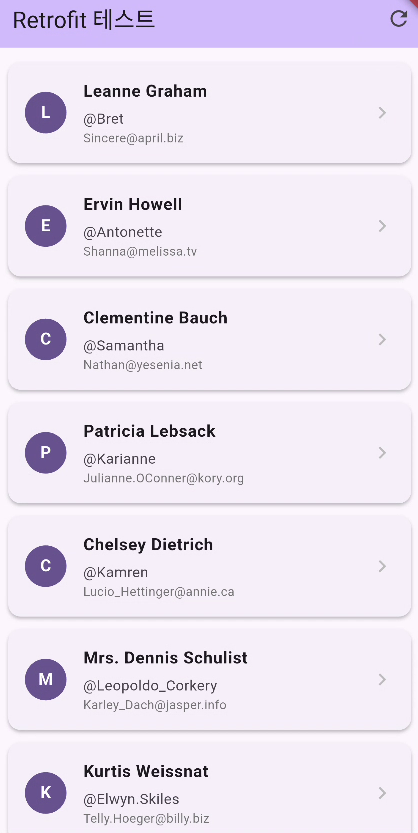
리스트 아이템을 클릭하면 카드 형태의 팝업이 표시된다.

오른쪽 위의 재시도 버튼을 누르면 재요청을 보내기 때문에 로딩 화면이 잠깐 표시되다가 다시 같은 화면이 표시된다.
요청과 응답 로그는 아래와 같다.
I/flutter (11589): 요청 : GET https://jsonplaceholder.typicode.com/users
I/flutter (11589): 응답 : 200
응답 로그 뒤에 response.data를 붙이면 어떤 응답이 왔는지 자세히 볼 수 있다.
아래는 response.data로 받은 응답을 붙여서 로그로 출력한 결과다.
I/flutter (11589): 요청 : GET https://jsonplaceholder.typicode.com/users
I/flutter (11589): 응답 : 200, [{id: 1, name: Leanne Graham, username: Bret, email: Sincere@april.biz, address: {street: Kulas Light, suite: Apt. 556, city: Gwenborough, zipcode: 92998-3874, geo: {lat: -37.3159, lng: 81.1496}}, phone: 1-770-736-8031 x56442, website: hildegard.org, company: {name: Romaguera-Crona, catchPhrase: Multi-layered client-server neural-net, bs: harness real-time e-markets}}, {id: 2, name: Ervin Howell, username: Antonette, email: Shanna@melissa.tv, address: {street: Victor Plains, suite: Suite 879, city: Wisokyburgh, zipcode: 90566-7771, geo: {lat: -43.9509, lng: -34.4618}}, phone: 010-692-6593 x09125, website: anastasia.net, company: {name: Deckow-Crist, catchPhrase: Proactive didactic contingency, bs: synergize scalable supply-chains}}, {id: 3, name: Clementine Bauch, username: Samantha, email: Nathan@yesenia.net, address: {street: Douglas Extension, suite: Suite 847, city: McKenziehaven, zipcode: 59590-4157, geo: {lat: -68.6102, lng: -47.0653}}, phone: 1-463-123-4447, website: ramiro.info, company
레트로핏 공식 문서에서 logger 라이브러리를 로그용으로 추가했는데 이걸 사용하도록 추가해 본다.
수정된 전체 코드는 아래와 같다.
import "package:dio/dio.dart";
import "package:flutter/material.dart";
import "package:flutter_practice/api/user_api.dart";
import "package:flutter_practice/model/user_dto.dart";
import "package:logger/logger.dart";

class RetrofitTest extends StatefulWidget {
  const RetrofitTest({super.key});

  @override
  State<RetrofitTest> createState() => _RetrofitTestState();
}

class _RetrofitTestState extends State<RetrofitTest> {
  late final UserApi _userApi;
  late final Logger _logger;
  List<UserDto> _users = [];
  bool _isLoading = false;
  String? _errorMessage;

  @override
  void initState() {
    super.initState();
    _initializeLogger();
    _initializeApi();
    _fetchUsers();
  }

  void _initializeLogger() {
    _logger = Logger(
      printer: PrettyPrinter(
        methodCount: 0,
        errorMethodCount: 5,
        lineLength: 80,
        colors: true,
        printEmojis: true,
        dateTimeFormat: DateTimeFormat.onlyTimeAndSinceStart,
      ),
    );
  }

  void _initializeApi() {
    final dio = Dio(
      BaseOptions(
        connectTimeout: const Duration(seconds: 30),
        receiveTimeout: const Duration(seconds: 30),
        headers: {
          "User-Agent": "...", /// TODO : 403 에러가 뜨면 User-Agent 수정
          "Accept": "application/json",
          "Accept-Language": "ko-KR,ko;q=0.9",
          "Accept-Encoding": "gzip, deflate, br",
          "Connection": "keep-alive",
        },
        followRedirects: true,
        maxRedirects: 5,
      ),
    );

    dio.interceptors.add(
      InterceptorsWrapper(
        onRequest: (options, handler) {
          _logger.i("=== API 요청 ===\n"
              "메서드 : ${options.method}\n"
              "URL : ${options.uri}\n"
              "헤더 : ${options.headers}");
          return handler.next(options);
        },
        onResponse: (response, handler) {
          _logger.d("=== API 응답 ===\n"
              "상태코드 : ${response.statusCode}\n"
              "데이터 : ${response.data}");
          return handler.next(response);
        },
        onError: (error, handler) {
          _logger.e(
              "=== API 에러 ===\n"
              "상태코드 : ${error.response?.statusCode}\n"
              "메시지 : ${error.message}\n"
              "타입 : ${error.type}",
              error: error,
              stackTrace: error.stackTrace);
          return handler.next(error);
        },
      ),
    );

    _userApi = UserApi(dio);
  }

  Future<void> _fetchUsers() async {
    _logger.d("사용자 목록 조회 시작");

    setState(() {
      _isLoading = true;
      _errorMessage = null;
    });

    try {
      final result = await _userApi.getUsers();
      if (mounted) {
        setState(() {
          _isLoading = false;
          _users = result;
        });
      }
    } on DioException catch (e, stackTrace) {
      _logger.e("사용자 목록 조회 실패", error: e, stackTrace: stackTrace);
      if (mounted) {
        setState(() {
          _isLoading = false;
          _errorMessage = _handleDioError(e);
        });
      }
    } catch (e, stackTrace) {
      _logger.e("알 수 없는 에러 발생", error: e, stackTrace: stackTrace);
      if (mounted) {
        setState(() {
          _isLoading = false;
          _errorMessage = "알 수 없는 에러: $e";
        });
      }
    }
  }

  String _handleDioError(DioException error) {
    if (error.response?.statusCode == 403) {
      _logger.w("403 Forbidden - Cloudflare 차단 가능성");
      return "접근이 거부되었습니다.\nCloudflare에 의해 차단되었을 수 있습니다.\n\n다른 네트워크로 시도하세요";
    }

    final errorMessage = switch (error.type) {
      DioExceptionType.connectionTimeout => "연결 시간 초과",
      DioExceptionType.sendTimeout => "전송 시간 초과",
      DioExceptionType.receiveTimeout => "응답 시간 초과",
      DioExceptionType.badResponse => "서버 오류: ${error.response?.statusCode}",
      DioExceptionType.cancel => "요청 취소됨",
      DioExceptionType.connectionError => "네트워크 연결 에러\n인터넷 연결을 확인해주세요",
      _ => "네트워크 에러: ${error.message}",
    };

    _logger.w("에러 처리: $errorMessage");
    return errorMessage;
  }

  @override
  void dispose() {
    _logger.close();
    super.dispose();
  }

  @override
  Widget build(BuildContext context) {
    return Scaffold(
      appBar: AppBar(
        title: const Text("Retrofit 테스트"),
        backgroundColor: Theme.of(context).colorScheme.inversePrimary,
        actions: [
          IconButton(
            icon: const Icon(Icons.refresh),
            onPressed: _isLoading ? null : _fetchUsers,
            tooltip: "새로고침",
          ),
        ],
      ),
      body: _buildBody(),
    );
  }

  Widget _buildBody() {
    if (_isLoading) return _buildLoadingView();

    if (_errorMessage != null) return _buildErrorView();

    if (_users.isEmpty) return _buildEmptyView();

    return _buildUserList();
  }

  Widget _buildLoadingView() {
    return const Center(
      child: Column(
        mainAxisAlignment: MainAxisAlignment.center,
        children: [
          CircularProgressIndicator(),
          SizedBox(height: 16),
          Text("로딩 중..."),
        ],
      ),
    );
  }

  Widget _buildErrorView() {
    return Center(
      child: Padding(
        padding: const EdgeInsets.all(32),
        child: Column(
          mainAxisAlignment: MainAxisAlignment.center,
          children: [
            const Icon(Icons.error_outline, size: 64, color: Colors.red),
            const SizedBox(height: 16),
            Text(
              _errorMessage!,
              style: const TextStyle(fontSize: 16, color: Colors.red),
              textAlign: TextAlign.center,
            ),
            const SizedBox(height: 24),
            ElevatedButton.icon(
              onPressed: _fetchUsers,
              icon: const Icon(Icons.refresh),
              label: const Text("재시도"),
            ),
          ],
        ),
      ),
    );
  }

  Widget _buildEmptyView() {
    return const Center(
      child: Column(
        mainAxisAlignment: MainAxisAlignment.center,
        children: [
          Icon(Icons.people_outline, size: 64, color: Colors.grey),
          SizedBox(height: 16),
          Text("사용자 데이터 없음"),
        ],
      ),
    );
  }

  Widget _buildUserList() {
    return ListView.builder(
      padding: const EdgeInsets.symmetric(vertical: 8),
      itemCount: _users.length,
      itemBuilder: (context, index) => _buildUserCard(_users[index]),
    );
  }

  Widget _buildUserCard(UserDto user) {
    return Card(
      margin: const EdgeInsets.symmetric(horizontal: 12, vertical: 6),
      elevation: 2,
      child: ListTile(
        contentPadding: const EdgeInsets.symmetric(horizontal: 16, vertical: 8),
        leading: _buildUserAvatar(user.name),
        title: Text(
          user.name,
          style: const TextStyle(fontWeight: FontWeight.bold),
        ),
        subtitle: _buildUserSubtitle(user),
        trailing: Icon(
          Icons.chevron_right,
          color: Colors.grey[400],
        ),
        onTap: () {
          _logger.d("사용자 상세 정보 - name : ${user.name}, id : ${user.id}");
          _showUserDetail(user);
        },
      ),
    );
  }

  Widget _buildUserAvatar(String name) {
    return CircleAvatar(
      backgroundColor: Theme.of(context).colorScheme.primary,
      child: Text(
        name[0].toUpperCase(),
        style: const TextStyle(
          color: Colors.white,
          fontWeight: FontWeight.bold,
        ),
      ),
    );
  }

  Widget _buildUserSubtitle(UserDto user) {
    return Column(
      crossAxisAlignment: CrossAxisAlignment.start,
      children: [
        const SizedBox(height: 4),
        Text("@${user.username}"),
        Text(
          user.email,
          style: TextStyle(
            fontSize: 12,
            color: Colors.grey[600],
          ),
        ),
      ],
    );
  }

  void _showUserDetail(UserDto user) {
    showDialog(
      context: context,
      builder: (context) => AlertDialog(
        title: _buildDialogTitle(user),
        content: _buildDialogContent(user),
        actions: [
          TextButton(
            onPressed: () {
              Navigator.pop(context);
            },
            child: const Text("닫기"),
          ),
        ],
      ),
    );
  }

  Widget _buildDialogTitle(UserDto user) {
    return Row(
      children: [
        _buildUserAvatar(user.name),
        const SizedBox(width: 12),
        Expanded(
          child: Text(
            user.name,
            style: const TextStyle(fontSize: 20),
          ),
        ),
      ],
    );
  }

  Widget _buildDialogContent(UserDto user) {
    return SingleChildScrollView(
      child: Column(
        crossAxisAlignment: CrossAxisAlignment.start,
        mainAxisSize: MainAxisSize.min,
        children: [
          _buildBasicInfoSection(user),
          const SizedBox(height: 16),
          _buildAddressSection(user.address),
          const SizedBox(height: 16),
          _buildCompanySection(user.company),
        ],
      ),
    );
  }

  Widget _buildBasicInfoSection(UserDto user) {
    return _buildSection(
      title: "기본 정보",
      children: [
        _buildInfoRow("ID", user.id.toString()),
        _buildInfoRow("사용자명", user.username),
        _buildInfoRow("이메일", user.email),
        _buildInfoRow("전화번호", user.phone),
        _buildInfoRow("웹사이트", user.website),
      ],
    );
  }

  Widget _buildAddressSection(Address address) {
    return _buildSection(
      title: "주소",
      children: [
        _buildInfoRow("거리", address.street),
        _buildInfoRow("스위트", address.suite),
        _buildInfoRow("도시", address.city),
        _buildInfoRow("우편번호", address.zipcode),
        _buildInfoRow("위도", address.geo.lat),
        _buildInfoRow("경도", address.geo.lng),
      ],
    );
  }

  Widget _buildCompanySection(Company company) {
    return _buildSection(
      title: "회사",
      children: [
        _buildInfoRow("회사명", company.name),
        _buildInfoRow("캐치프레이즈", company.catchPhrase),
        _buildInfoRow("사업", company.bs),
      ],
    );
  }

  Widget _buildSection({
    required String title,
    required List<Widget> children,
  }) {
    return Column(
      crossAxisAlignment: CrossAxisAlignment.start,
      children: [
        Text(
          title,
          style: const TextStyle(
            fontWeight: FontWeight.bold,
            fontSize: 16,
            color: Colors.black87,
          ),
        ),
        const SizedBox(height: 8),
        ...children,
      ],
    );
  }

  Widget _buildInfoRow(String label, String value) {
    return Padding(
      padding: const EdgeInsets.symmetric(vertical: 4),
      child: Row(
        crossAxisAlignment: CrossAxisAlignment.start,
        children: [
          SizedBox(
            width: 90,
            child: Text(
              "$label : ",
              style: TextStyle(
                fontWeight: FontWeight.w500,
                color: Colors.grey[700],
              ),
            ),
          ),
          Expanded(
            child: Text(
              value,
              style: const TextStyle(
                fontWeight: FontWeight.w400,
                color: Colors.black87,
              ),
            ),
          ),
        ],
      ),
    );
  }
}
_initializeLogger()에서 printEmojis를 true로 설정하면 로그 레벨에 따라 표시되는 이모지가 각각 다르다.

다음 포스팅에선 사용된 라이브러리들이 무엇인지와 네트워크 통신에 사용된 코드들을 확인한다.
'Flutter' 카테고리의 다른 글
| [Flutter] 다양한 유저 입력 다루기 - 2 - (0) | 2025.11.27 |
|---|---|
| [Flutter] 다양한 유저 입력 다루기 - 1 - (0) | 2025.11.21 |
| [Flutter] 핸드폰 흔들기 감지 - shake 라이브러리 사용법 (0) | 2025.11.16 |
| [Flutter] fatal: detected ownership in repository at '플러터 설치 경로' 에러 해결 (0) | 2025.11.15 |
| [Flutter] 리스트뷰 구현 시 shrinkWrap 프로퍼티를 꼭 써야 하는가? (0) | 2025.10.26 |
